
Holiday-Season Google Ads Prep for Service Businesses — Budget Shifts That Compound
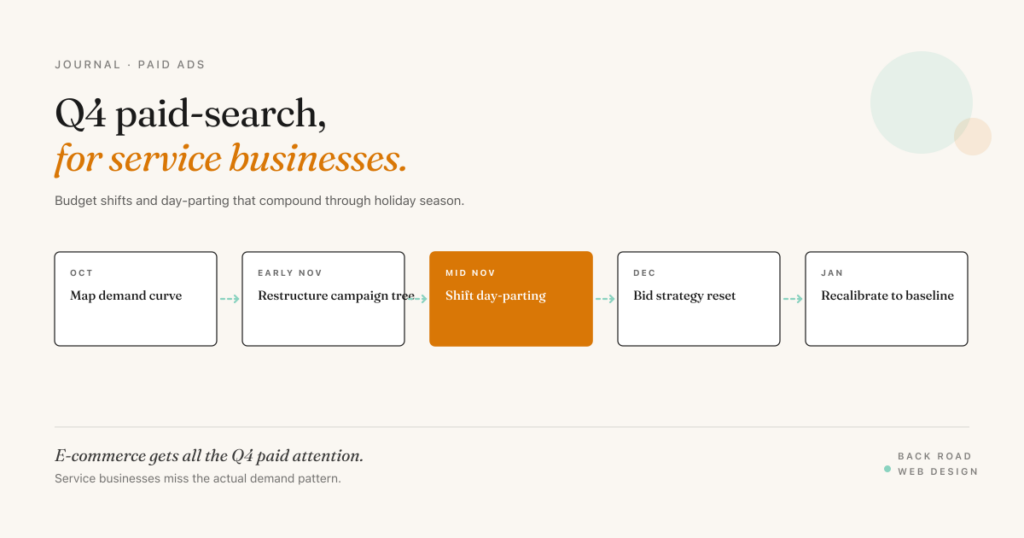
E-commerce gets all the attention in Q4 Google Ads planning. Service businesses tend to assume holiday season doesn’t apply — and miss the actual seasonal demand patterns that matter for their categories.
I run paid campaigns for service businesses across California, and the Q4 patterns are consistent: search volume shifts (some categories spike, some dip), buyer behavior changes (more research-mode searches in November, more decisive-action searches mid-December and early January), and competition shifts as e-commerce advertisers pull budget from broad-match categories to focus on retail. That last shift in particular creates an opening for service businesses who stay active.
Here’s what I check, adjust, and re-budget on every service-business account between mid-October and the end of December.
Map your category’s actual seasonal curve
Before anything else, look at the last two years of search-volume data for your category in Google Trends and your Google Ads account’s historical impression data. Most service categories fall into one of four seasonal patterns:
Counter-cyclical demand — categories that spike in Q4 because winter or holiday creates the need. HVAC (heating-related searches), plumbing (cold-snap pipe issues), roofing (storm damage), pest control (winter-rodent searches in California specifically), home cleaning (pre-holiday and post-holiday spikes). For these, Q4 is peak season — the budget shift is upward.
Steady-state demand — categories that don’t shift much seasonally. Medical practices, accounting (until tax season), home services for routine maintenance. For these, the work is staying steady through the holiday distractions everyone else introduces.
Pulled-forward demand — categories where buyers move quickly in late Q4 to use end-of-year budgets or get work done before the new year. Legal services for business filings, B2B services with calendar-year procurement cycles, some categories of consulting. Mid-November through mid-December tends to be the spike.
Q4 dip — categories that genuinely slow in Q4 (luxury home renovations get pushed to Q1, large landscaping projects pause). For these, the move is leaning into low-CPC opportunity rather than fighting for premium volume.
You probably already know which one you’re in. The data confirms it.
Restructure the campaign tree before adjusting budgets
Most Q4 budget adjustments fail because the campaign structure is still optimized for the rest of the year. Before increasing or decreasing spend, check that your campaign tree separates the seasonal patterns cleanly.
For a counter-cyclical category, you want a separate campaign for the seasonal search terms (e.g., “furnace repair” / “heater not working” / “no heat”) with its own budget cap, independent of your evergreen campaigns. This lets you push budget into the seasonal terms without inflating your evergreen CPC by competing against yourself.
For a pulled-forward category, separate the urgency keywords (“emergency {service}” / “{service} this week”) into their own campaign with aggressive bidding and tight day-parting.
If your current setup mixes seasonal and evergreen terms in one campaign, do this restructure first. The budget shifts work much better when the structure can absorb them.
Shift day-parting to match holiday call windows
Service businesses convert primarily via phone calls, and in the accounts I run most of those calls come in fast — often the same day someone searches. Day-parting matters more than most operators realize.
Default Google Ads schedules tend to run roughly business-hour-weighted. Holiday-season call windows are different:
- Weekday mornings often start earlier — people scheduling around shorter holiday workdays
- Friday afternoons tend to fade earlier — office workers often check out before mid-afternoon in December
- Saturday mornings spike — people doing home-related research over weekend coffee
- Mid-week evenings (after 7 PM Tue/Wed/Thu in November and early December) — household decision-making time
Pull the last three Decembers of your call data (or your conversion data if calls aren’t tracked) and look at when conversions actually happened. Adjust your campaign day-parting to match. In most service-business accounts I look at, there’s spend to reclaim from hours that historically didn’t convert.
Pre-write your storm-response copy (counter-cyclical only)
For HVAC, plumbing, roofing, tree service, and similar storm-or-cold-snap categories, the highest-impact move is having your storm-response ad copy and landing pages written and approved before the storm hits.
When a cold snap or storm window arrives, you want to be live within hours, not days. Most accounts don’t have the copy ready, so the response is reactive — by the time the ad copy gets approved, the demand window is past.
Author the copy in October: an ad set for “no heat” / “no AC” / “frozen pipes” with landing pages already published and conversion tracking already configured. Pause the campaign. When demand spikes, you unpause and you’re in market within an hour.
Reset bid strategy for the holiday window
Most accounts run a target-CPA or target-ROAS bid strategy that learned from the previous quarter’s data. Q4 demand shifts will throw off the model’s assumptions — costs go up, conversion rates change, the auction itself shifts.
For the counter-cyclical and pulled-forward categories, I temporarily switch from target-CPA to maximize-conversions for the seasonal campaign during the peak window, then switch back to target-CPA in early January once the new pattern stabilizes. The reasoning: target-CPA restrains bidding to hold an average cost per conversion, so when auction costs climb during a demand spike it can forgo clicks and miss the peak. Maximize-conversions drops that guardrail and bids into the full demand window, up to your budget.
For steady-state categories, leave bid strategy alone. The seasonal shift isn’t large enough to justify the disruption.
Budget cap math, not budget cap feelings
The instinct in Q4 is to “increase the budget by 20%” or some similar gut-feel number. The cleaner approach: estimate the seasonal demand uplift from your historical data, multiply by your average cost per conversion, and back into the budget number that captures the demand without leaving spend uncommitted.
Example math for a counter-cyclical category running at $2,000/mo evergreen:
- Historical Q4 search volume = 60% higher than Q3 average
- Average cost per conversion = $80
- Q3 conversions at $2,000 spend = 25/month
- Q4 expected demand = 25 × 1.6 = 40 conversions
- Budget needed to capture all of it = 40 × $80 = $3,200/month
Treat $3,200 as a floor, not a ceiling — cost per conversion tends to rise in peak season (the same auction pressure the bid-strategy section covers), so the real number lands a bit higher.
If you can’t fund the full $3,200, set the seasonal campaign cap at what you can fund and accept that you’ll be impression-share-constrained on the highest-demand days. That’s better than under-budgeting the evergreen and missing both.
Don’t pause organic momentum to fund paid
The trap most service businesses fall into: cutting other marketing investments (SEO retainer, content production, GBP work) in Q4 to fund paid because paid is “more immediate.” That math almost always loses on the back end. The organic and local-search work that produced February’s leads was the work that ran in October and November. Cutting it for Q4 paid creates a January–February gap that’s hard to recover from.
If your Q4 paid plan requires pulling from another channel, the plan is too aggressive. Tighten the paid plan instead.
For service businesses without strong organic visibility yet, the free strategy audit is the place to start. Paid amplifies what’s already there; if the foundation is weak, the paid spend works less efficiently.
Related reading: Google + Meta Ads Budget — San Luis Obispo · What Does a Customer Actually Cost — Marketing ROI Math · SEO or Google Ads First — Decision Guide. Looking for hands-on help? See Paid Advertising.