
Medical Practice GBP — Patient-Trust Signals That Move Bookings Before the Form Loads
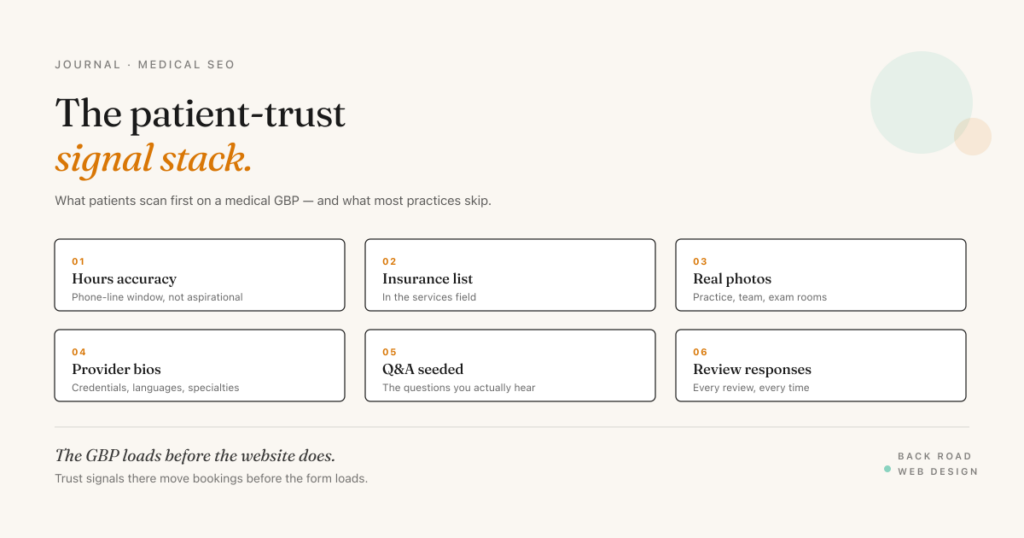
A patient looking for a new provider behaves differently from someone looking for a coffee shop. The search starts with anxiety, the trust threshold is higher than almost any other local service category, and the decision is rarely made in the first session. The patient looks at the Google Business Profile, scrolls reviews, opens the website, closes it, checks the profile again, and only books when the trust signals across all the surfaces line up.
The Google Business Profile is the first surface most patients see. It loads instantly in search results, it carries the star rating and review count as the most prominent visual elements, and it answers — or fails to answer — the questions a patient asks before they’re willing to click through to a website at all.
Most medical practice profiles I audit haven’t been touched since they were set up. The patient-trust signals that move bookings either aren’t there or aren’t tuned for how medical patients actually evaluate a provider. Here’s what I look for, in the order patients actually scan the profile.
Hours accuracy beats hours generosity
Patients trust profiles where the hours match reality. They distrust profiles where the hours are aspirational — listed as open 8 AM to 6 PM but the front desk doesn’t pick up until 9 AM, or open Saturday but voicemail-only.
If your practice has a phone-line answering window that’s narrower than the physical office hours, list the phone-line window as the hours. A profile that says “Mon–Fri 9 AM–5 PM” with a real human answering matches patient expectations and earns the call-through. A profile that says “Mon–Fri 8 AM–6 PM” but routes pre-9 calls to voicemail does the opposite — patients call, get voicemail, and assume the practice is too busy or disorganized to take new patients.
Holiday hours matter more for medical practices than most categories. A patient with an acute issue checks the profile on a holiday to see if they can be seen. If the profile shows open and the office is closed, that’s a trust hit. Set holiday hours explicitly in the GBP dashboard for every federal holiday and any practice-specific closures.
Insurance information in the services list
The single most-asked question new patients have is “do you take my insurance.” Practices that surface this in the GBP services list shorten the decision cycle dramatically.
Go to the services section of the GBP dashboard and add a service called “Insurance plans accepted” (or a similar variant). In the description field, list the major carriers you accept — Blue Shield, Anthem, United, Aetna, Medicare, Medicaid (Medi-Cal in California), TriCare, etc. List specific plan tiers if you accept some plans only at specific tiers.
This single addition is the highest-impact trust signal I see across medical GBPs. Most practices treat insurance information as a phone-call topic — “call us to verify your insurance is accepted.” That’s a friction step that costs you bookings. Patients who can confirm coverage on the profile book directly; patients who have to call first are the ones you lose when the call goes to voicemail or the front desk is slammed.
If you accept too many plans to list cleanly in the services field, use the “from the business” 750-character description to summarize (“We accept most major insurance carriers including Blue Shield, Anthem, United, Aetna, and Medicare. For a full list or to verify your specific plan, call us at…”).
Photos that show the practice, not stock imagery
Generic stock photos of doctors and medical equipment are the default on most practice profiles and they actively hurt trust. They read as templated and signal the practice didn’t invest in showing patients what to actually expect.
The patient-trust photo set is:
- The exterior of the building from the parking lot perspective (so patients can find the door)
- The reception desk and waiting area
- The exam rooms (a few of them — different specialties have different room layouts)
- The team (real headshots of providers and staff, with names and roles in the caption)
- The neighborhood context (the storefront with a recognizable street, or the medical complex with the campus name visible)
20+ photos with at least 8 showing the actual practice. Update at least quarterly. A profile that hasn’t added photos in three years signals dormancy; an active photo cadence signals an active, currently-operating practice.
Provider listings with credentials and bios
Google supports separate practitioner listings — an individual Business Profile for each public-facing provider, linked to the practice location — and most multi-provider practices never set them up. Each provider gets their own profile with their name and credential in the title (MD, DO, NP, PA), and the profile’s description field is where board certifications, languages spoken, and a short bio live.
A patient searching “Dr. Anderson family practice San Luis Obispo” who lands on a practitioner profile with credentials and a clean photo books faster than one who sees only the practice name with no provider context.
For solo-provider practices, the “from the business” description does the same work — name the provider, list credentials, give the patient something to attach trust to.
The front-desk questions, answered where Google can find them
For years the play here was seeding the GBP Q&A section with common patient questions. That section is gone — Google retired public Q&A in late 2025 and now generates answers to patient questions itself, pulling from whatever it can read: your profile description, your services list, and your website.
Which means the questions your front desk hears most often need written answers somewhere Google indexes:
- “Do you accept new patients?”
- “How long is the wait for a new patient appointment?”
- “Do you take walk-ins or only appointments?”
- “Is the office wheelchair accessible?”
- “Is there parking?”
- “Do you have weekend or evening hours?”
- “What languages are spoken in the office?”
Put the answers in three places: the “from the business” description for the biggest two or three, the services list where an answer maps to a service, and an FAQ section on your website — marked up with FAQPage schema — for the full set. The on-site FAQ is what feeds Google’s AI answers and the AI search tools patients increasingly ask first, so the same answers work whether a patient is scanning your profile or asking a chatbot who’s taking new patients nearby.
Reviews and responses (the YMYL category)
Medical falls into Google’s YMYL (Your Money or Your Life) category, which means review quality matters more than for almost any other vertical. In the medical GBPs I audit, the rough working scale looks like this:
- Under about 4.0 stars — most patients filter out the listing. Active review acquisition is the priority.
- Low-to-mid 4s — competitive. The review responses become a major trust signal.
- High 4s — strong. The focus shifts to recency and response quality.
Every review needs a response, especially the negative ones. The response is publicly indexed, so it’s another place to demonstrate professionalism and tone. Negative-review responses follow a pattern: acknowledge the experience, apologize where appropriate, name a path to make it right (call the practice manager directly, schedule a follow-up), and don’t argue. Future patients reading negative reviews and seeing thoughtful responses often weight the practice more positively than ones with no negative reviews at all.
The “from the business” description as the trust paragraph
The 750-character “from the business” field is where most medical practices either say nothing or say marketing-flavored nothing. The trust paragraph that works:
- Names the practice
- Names the provider(s) and credentials
- Names the specialties or services
- Names insurance carriers accepted (briefly — full list lives in services)
- Names what makes the practice distinct (sub-specialty, language capabilities, weekend hours, in-house imaging, etc.)
- Names the booking path (“Call us at… or book online at…”)
Plain language. Skip the marketing-flavored generalities — “full-service care for the whole family” tells patients nothing. Specifics tell them everything: “Dr. Anderson and Dr. Lee see new family-practice patients in our SLO office. We accept Blue Shield, Anthem, and Medicare. New-patient appointments typically book within 3–5 business days.” That is everything they need to make the next decision.
The 27-item version
This post covers the trust-signal core. The full 27-item version of the GBP audit — including service-area definition, category set, photo cadence, posts, products, and per-vertical notes for medical practices specifically — is the GBP Optimization Checklist. It’s a free Google Doc you copy into your own Drive.
Related reading: Medical Practice SEO Central Coast · Patient Acquisition Cost — Medical Practice · Google Business Profile Mastery 2026. Looking for hands-on help? See Medical Practices Digital Marketing.